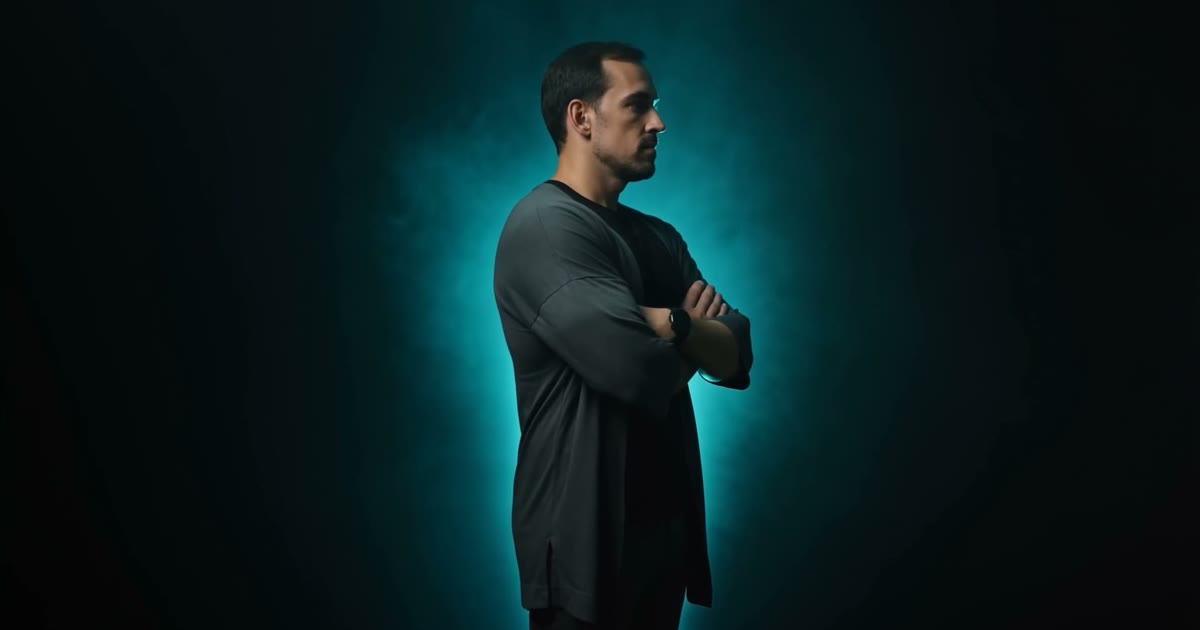
The brief I set myself: an award-show style portfolio where the central 3D element is me. A camera orbits around me as you scroll, my name tracks in letter by letter, and two more AI-generated films anchor the content sections. Everything on the finished site was generated, coded, debugged and deployed in a single day. This is the full build log.
What is Seedance 2.0?
Seedance 2.0 is ByteDance's reference-driven video generation model. It accepts image, video and audio references, holds character identity across generations, and outputs 4 to 15 second clips at up to 4K in standard mode. That reference-driven part is the entire reason this project works: a portfolio starring an AI-generated stranger would be pointless.
The identity lock: one face across three clips
The single most important decision came before any prompt was written. I created a reusable character element from clear reference photos of myself, then attached that same element to every generation. Text descriptions alone will not hold a face steady across clips; a pinned reference will.
Two practical lessons from this step:
- Lock the wardrobe in words. The element holds the face, but clothing drifts unless every prompt repeats it exactly. Mine was "fitted black t shirt under a dark charcoal open overshirt" in all three prompts.
- State what the skin looks like. The first render batch gave me arm tattoos I do not have. The fix was an explicit line in every prompt: clean unmarked skin, no tattoos, no ink, plus sleeves worn down to reduce bare skin the model could improvise on. The regenerated clips came back clean.
The three shots
Each clip is 8 seconds, 1080p, 16:9, standard mode, audio off. The camera language in the prompts matters more than the adjectives:
- Hero orbit. Subject stands arms crossed in a black void with cyan rim lighting while the camera performs one slow continuous 360 degree orbit at eye level. The phrase "no cuts" pulls the model away from editing into montage.
- The builder. Seated at a dark desk surrounded by floating holographic dashboards, with a slow push-in from medium shot to close-up over the full 8 seconds.
- The closer. Walking toward camera down a corridor of glowing screens, with a dolly back matched to walking pace, stopping in a hero pose in the final second.
The numbers
| Item | Value |
|---|---|
| Clips generated (final set) | 3 × 8s, 1080p, 16:9 |
| Hero frame sequence | 121 JPEG frames, 15fps, 1920px wide |
| Frame sequence weight | 5.3 MB total (dark scenes compress well) |
| Video weight after remux | 7.8 + 6.5 + 6.1 MB |
| Scroll runway for the orbit | 150% of viewport height, pinned |
| Full build, prompt to production URL | 1 day |
Scroll-scrubbing the orbit
Browsers cannot reliably scrub a video element by scroll position, so the hero uses the film industry trick: export the clip as a frame sequence and draw it onto a canvas. ffmpeg extracts 121 frames, the browser preloads them with limited concurrency, and GSAP ScrollTrigger maps scroll progress to frame index. The result feels like dragging a film strip.
Bug worth knowing: position: sticky silently stops working when any ancestor has overflow-x: hidden. The hero originally scrolled away leaving a wall of black. The fix is overflow-x: clip on the page body plus GSAP's pin instead of sticky, which is immune to the problem.
A second lesson: never size display type with viewport-width guesses. The headline is measured after fonts load and scaled so the full word exactly fits the screen, on any screen. Fluid type clamps lied to me twice before I switched to measurement.
The deploy bug that made every video look broken
After deploying behind a CDN, all three videos stopped playing while every other asset worked. Two facts combined into the failure:
- The generated MP4s stored their moov atom (the playback index) at the end of the file.
- The CDN cache answered range requests with a full 200 response instead of 206 partial content.
Browsers need the index before they can start playback. Normally they fetch it with a range request to the end of the file; with ranges unavailable, they were forced to download entire clips before showing a single frame, which reads as "the videos are broken." The fix takes one ffmpeg flag: remux with -movflags +faststart so the index sits in the first 2 KB. Playback starts immediately and streams progressively even over rangeless responses. If you publish AI video to the web, make faststart a non-negotiable export step.
Making it fast
Static assets are versioned in their URLs and served with a one year immutable cache header, so the CDN edge holds the heavy frames and clips close to visitors and repeat visits skip the network entirely. HTML stays on a five minute cache so content updates appear quickly. After warming, the 6.5 MB builder clip serves from edge cache in about 2 seconds.
FAQ
How do you keep the same face across multiple Seedance 2.0 generations?
Create a reusable character element from clear reference photos, then attach that element to every generation. Repeat the wardrobe description verbatim in each prompt, and explicitly describe skin details you care about. Text alone will not hold identity; the pinned reference will.
What resolution and duration does Seedance 2.0 support?
4 to 15 second clips at up to 4K in standard mode; fast mode trades quality for speed at 480p or 720p. This build used standard mode at 1080p for a balance of quality and generation time.
Can you scroll-scrub an AI video on a website?
Yes: export a JPEG frame sequence with ffmpeg, preload it, and draw the frame matching scroll progress onto a canvas with GSAP ScrollTrigger. Keep total sequence weight under about 8 MB and it stays smooth on ordinary connections.
Want this kind of build for your business?
I build AI systems, custom company dashboards and automation for growing businesses. NexBDM starts every engagement with a free automation autopsy: we find where your business bleeds time and money, then show you exactly what to fix first.
Get your autopsy Email me